FAQ
1.-Can I open a few accounts for one client?
-You can have multiple contact for client and open a trading account for the contact. You would need additional email &/ username.
2. -How do I fire FTD?
-You've got to receive the lead and find in in your CRM first. After, you have to press on green and blue buttons - "Open the Trading account" and "Conver to traders".
3. -How can a client access his dashboard?
-Make sure the link of your crm ends with /login/. When converting to trader, we allow you to open this portal account. Make sure to whitelist the email or IP.
4. -What is required to open the account with Nfinx?
-Email and website under our setup. All you need is: Company registered, Director ID, POA. Regarding opening your account with us, we will need:
- Company Registration Document (PDF)
- Legal Company Name
- Company ID Number (VAT number if in EU)
- Owner ID
- Company Address POA
- First name & Last name (for the agreement & Account)
- Email address & Phone number (for the agreement & Account)
5. -I added money to Margin account via the Balances but why can't I see money on the account?
-You should go to Summary -> Groups-> Make sure you have there Margin, for example "Spot and Margin"
6. -If I delete the position, what will happen?
-The money will go back to the account.
7. -How can I identify if it’s data or live lead?
-Live lead "Has a trading account". Has a trading account and a platform tab. You can filter it here:
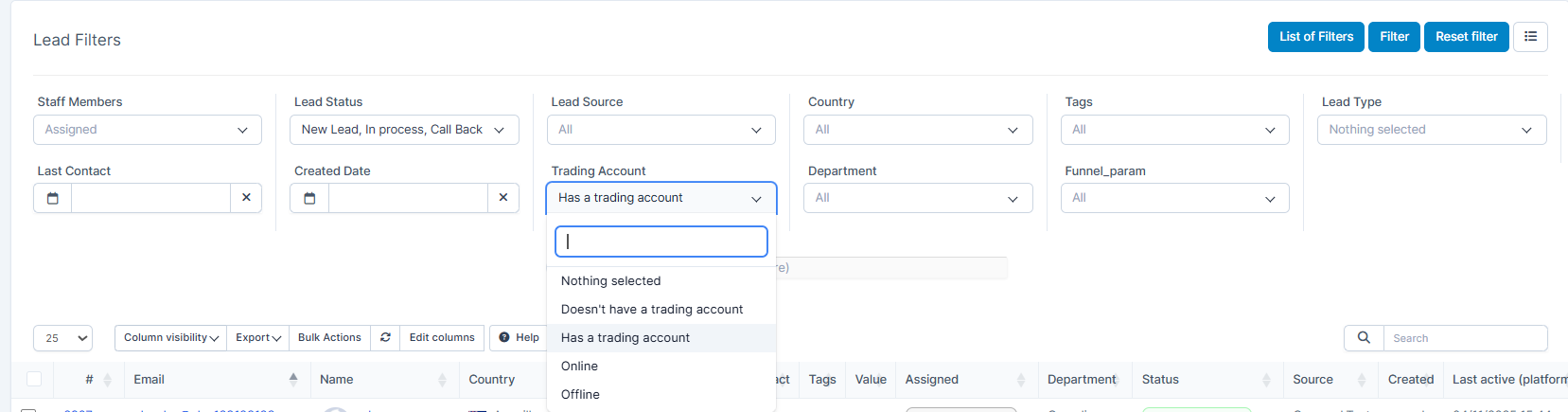
Funnel param and source param can be found here (FOR API: leads_funnel_param. leads_source_param):
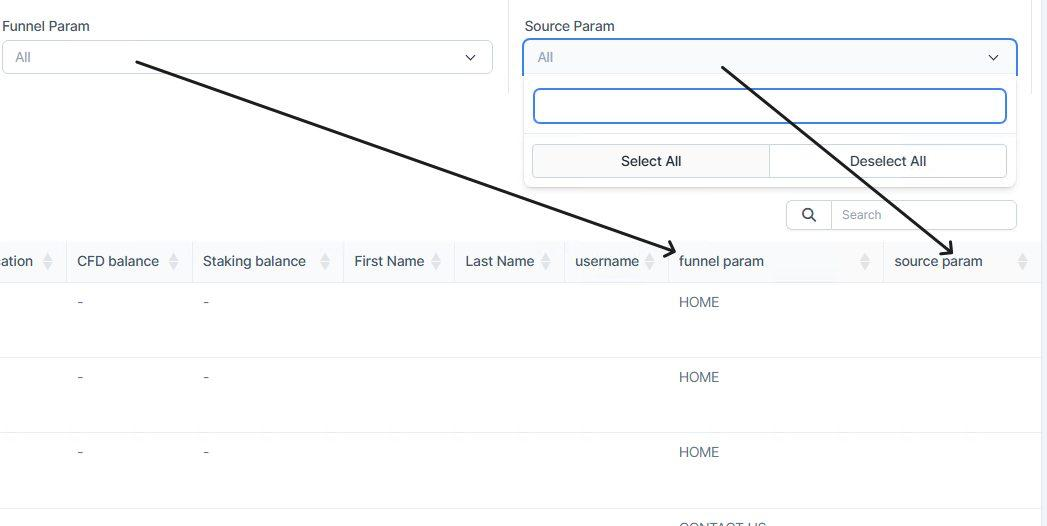
8. -Every time we close a trade on the platform, we need to refresh to see the balance updated.
-On CFD account, when you close a trade balance should reflect immidiately upon trade close.
9. -What's a "liquidity price"?
-Meaning that the position is 100% negative.
10. -Can we delete staff members in bulk.
-It's not possible for safety reasons as the staff members information is later transferred to another staff member in order to not to being lost.
Glossary
View Own - permission that will allow the agent to view only information which is related/assigned to them. [Setup-> Staff-> Pick the staff member-> Permissions]
View Global - permission that will allow the agent to view all the information. [Setup-> Staff-> Pick the staff member-> Permissions]
Fire FTD (a First Time Deposit) - after the affiliate integration has taken place, the "fire FTD" means that the affiliate test lead has arrived in the client's CRM. [Search -> type in the lead email-> press COnvert to trader & Open trading account]
Team lead/Head - functions the same way as "Manager" of a particular department [Setup-> Staff-> Pick the staff member-> Permissions-> Manager. ALSO Setup-> Department-> Add the agent to the department]
Broker - functions the same way as "agent"
Creds (Credits) - email and password
Mailbox configuration - function that helps to link the agent's email to our CRM with the ability to send emails from/to the CRM How To Configure The Mailbox In The CRM
WL (White Label) - is a business solution that allows brokers to provide clients with trading services under their own brand, using products and technologies developed by other companies. In the context of financial markets, it is convenient and favourable for setting up one's own business.
IB (Introducing Broker) - a company or individual that introduces its clients to a forex or CFD broker
CFD (Contract For Difference) - a CFD allows you to obtain an indirect exposure by opening long (buying) or short (selling) positions in an underlying asset such as security, commodity, index, cryptocurrency and other asset types.
Platform - app, the actual crypto aggrigator. See example here: https://demo.podcator.com/
CRM (Customer Relationship Management) - See example here: https://demo.podcator.com/
c2c (call-to-call/controller-to-controller/costumer-to-costumer) - communication refers to the direct exchange of data and commands between two or more controllers within a network, commonly used in industrial automation systems. This technology enables controllers to communicate autonomously, improving overall system efficiency and responsiveness without the need for centralized control or manual intervention.
Cron - command used for scheduling tasks to be executed sometime in the future. This is normally used to schedule a job that is executed periodically – for example, to send out a notice every morning.