How to Change Liquidation Percent?
IN THE CRM
Step 1. Go to "Setup" in the crm in the menu on the left side of the page.

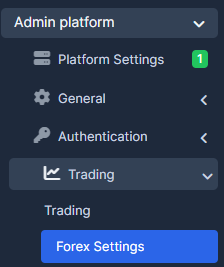
Step 2. Choose "Admin Platform" tab, select "Trading" and press on "Forex Settings".
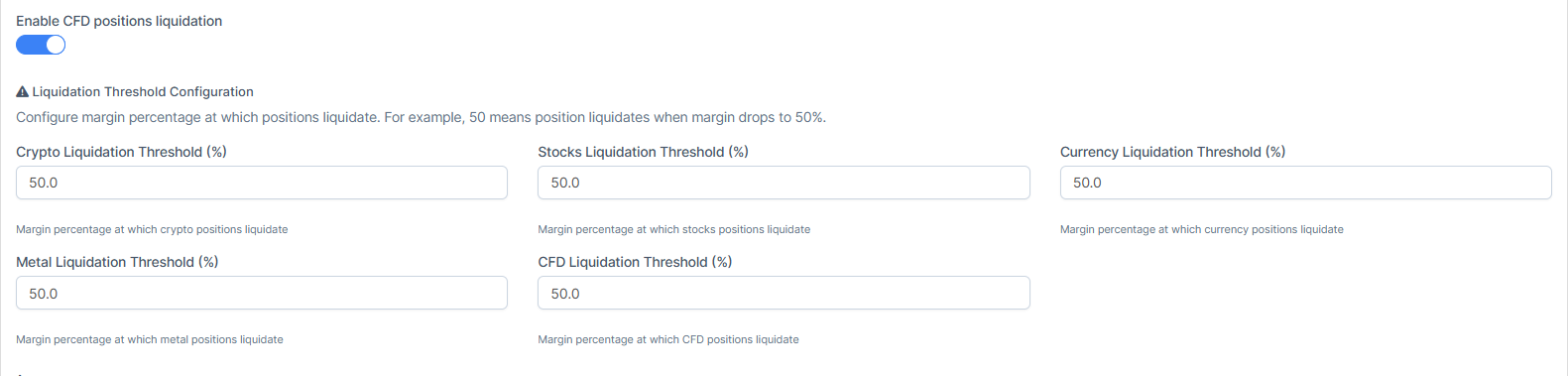
Step 3. Make sure the "CFD Positions Liquidation" is enabled. If the checkbox is disabled, it will disable all the liquidation variants. If it is enabled, the threshold values should be changed to adjust the amount that the user may lose on the position.
You can select here any Liquidation Threshold for your request. For example "CFD Liquidation Threshold" and edit the amount to the required one.
Step 4. Once done, press on "Save Settings" to remember the choice.
FAQ
Q: How does it work?
A: If liquidation is set to 50%, positions are getting closed aroud the -50% liquidation mark.
Q: What should I do so the positions to get closed in the moment they have no margin left?
A: Set it closer to 95-100%. It will close the position when margin for position is liquidating. You can also set more than 100%. For example, 1000%, the position will close if they win 1000% which is almost impossible.
Q: How to see if the position was closed by the Liquidation?
A: You can see the close reason on a popup when standing over the close date. You can find it by going to the Manager Platfrom -> Trading-> CFD positions-> Direct the mouse on the date of the closed position.
